How to Run a White Space Analysis With AI
A white space analysis finds the new-business spaces where customer need meets what a company already owns, and where few competitors are active yet. Here is how to run one with AI on Apify in five steps, on a real example: the insulation business of a large European building-materials company in Germany and the Netherlands.

A white space analysis finds the new-business spaces where customer need meets what a company already owns, and where few competitors are active yet. Here is how to run one with AI on Apify in five steps, on a real example: the insulation business of a large European building-materials company in Germany and the Netherlands.

Where white space work usually stalls
The ask is short. The board wants a new business – €50M of revenue in five years – and a recommendation for the strategy committee. Then the work starts: market scans, competitor lists, thirty-odd browser tabs, a deck on its seventh version. By the meeting there is a lot of material and still no clear answer to where the company should play.
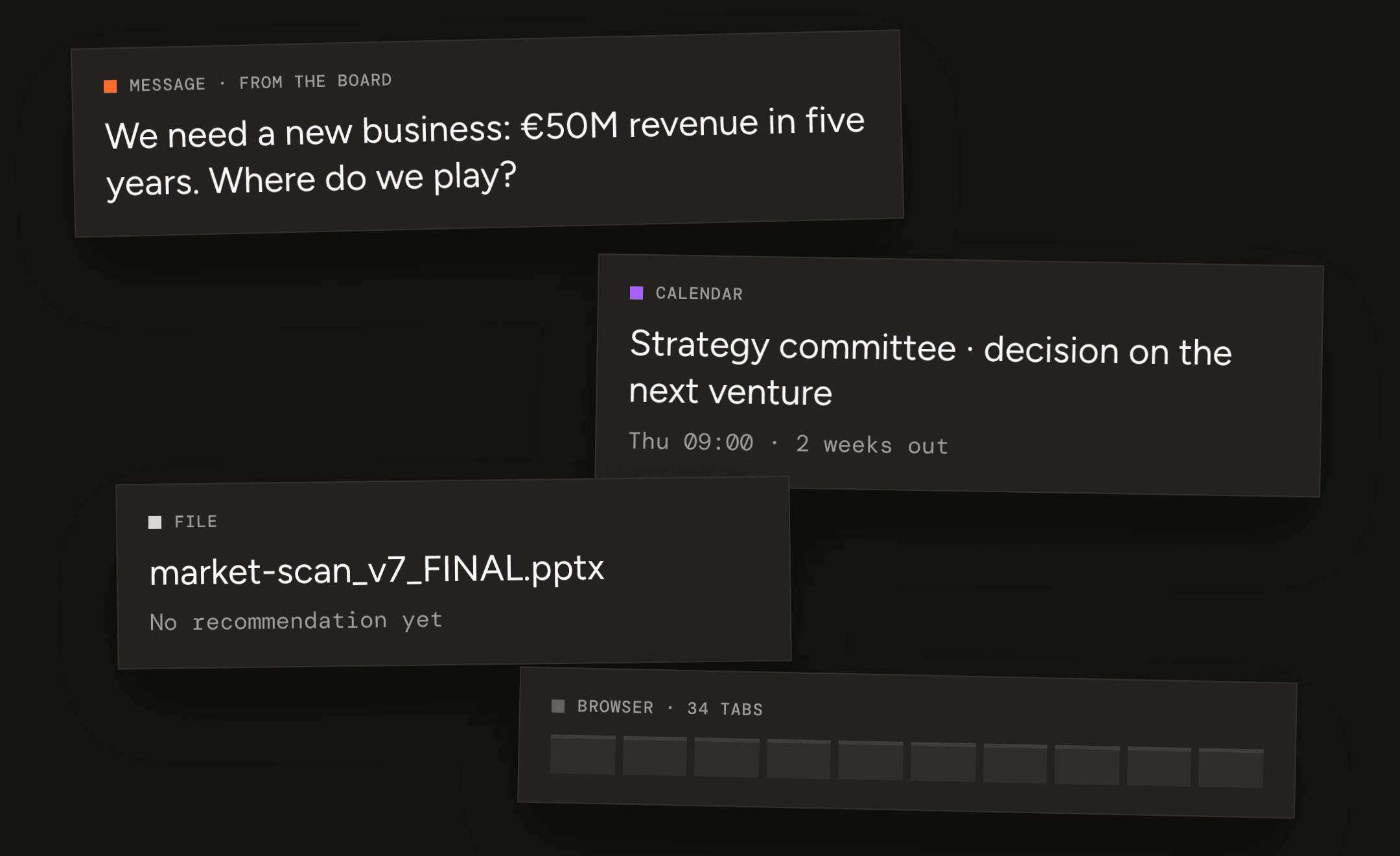 The usual starting point: a target, a deadline and a lot of tabs.
How to run a white space analysis with AI in five steps
Here is the same job with AI agents doing the research. You set four inputs and talk to customers; in between, the agents research the market, rank the spaces and frame the problem. Below, each step on a real example.
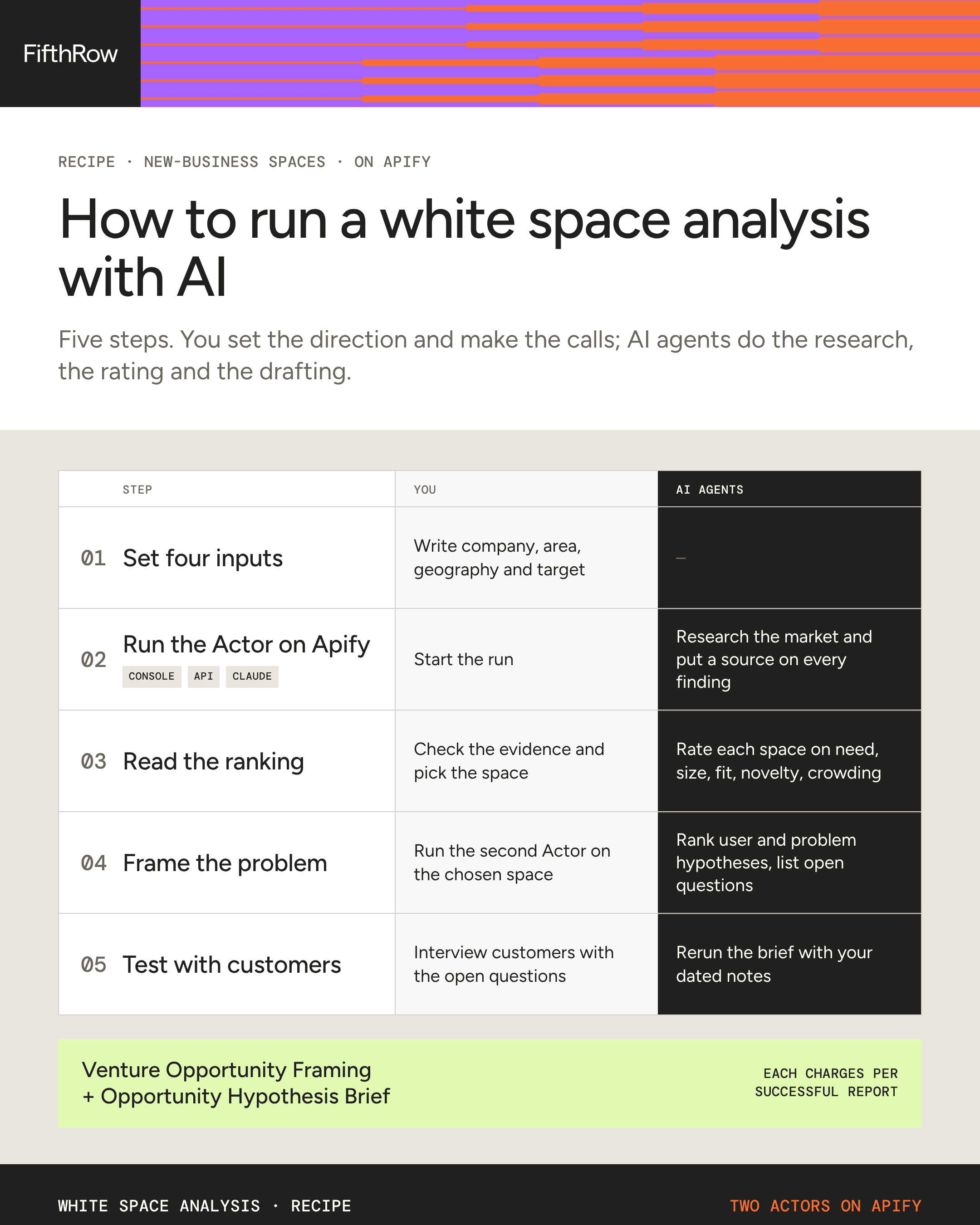 The recipe on one page: what you do and what the AI agents do at each step.
Step 1: Set four inputs
The analysis runs as an Actor – a ready-made agent you run on Apify – called Venture Opportunity Framing. It takes four fields, a line or two each:
- Company: the parent company and its website. We used a large European insulation maker.
- Signals and assets: the area to explore. Ours: taking back and recycling mineral wool insulation.
- Target geography: where the new business should play. Ours: Germany and the Netherlands.
- Venture mandate: what the new business must achieve. Ours: €50M revenue in five years.
The last field is the one to think about. The report checks every space against it, and where public sources can't size a space, it says so and lists what's missing.
Step 2: Run the Actor on Apify
You can start the Actor from Apify Console, the Apify API or an AI assistant; all three are explained at the end of this post. We asked an assistant with Apify connected, in one sentence:
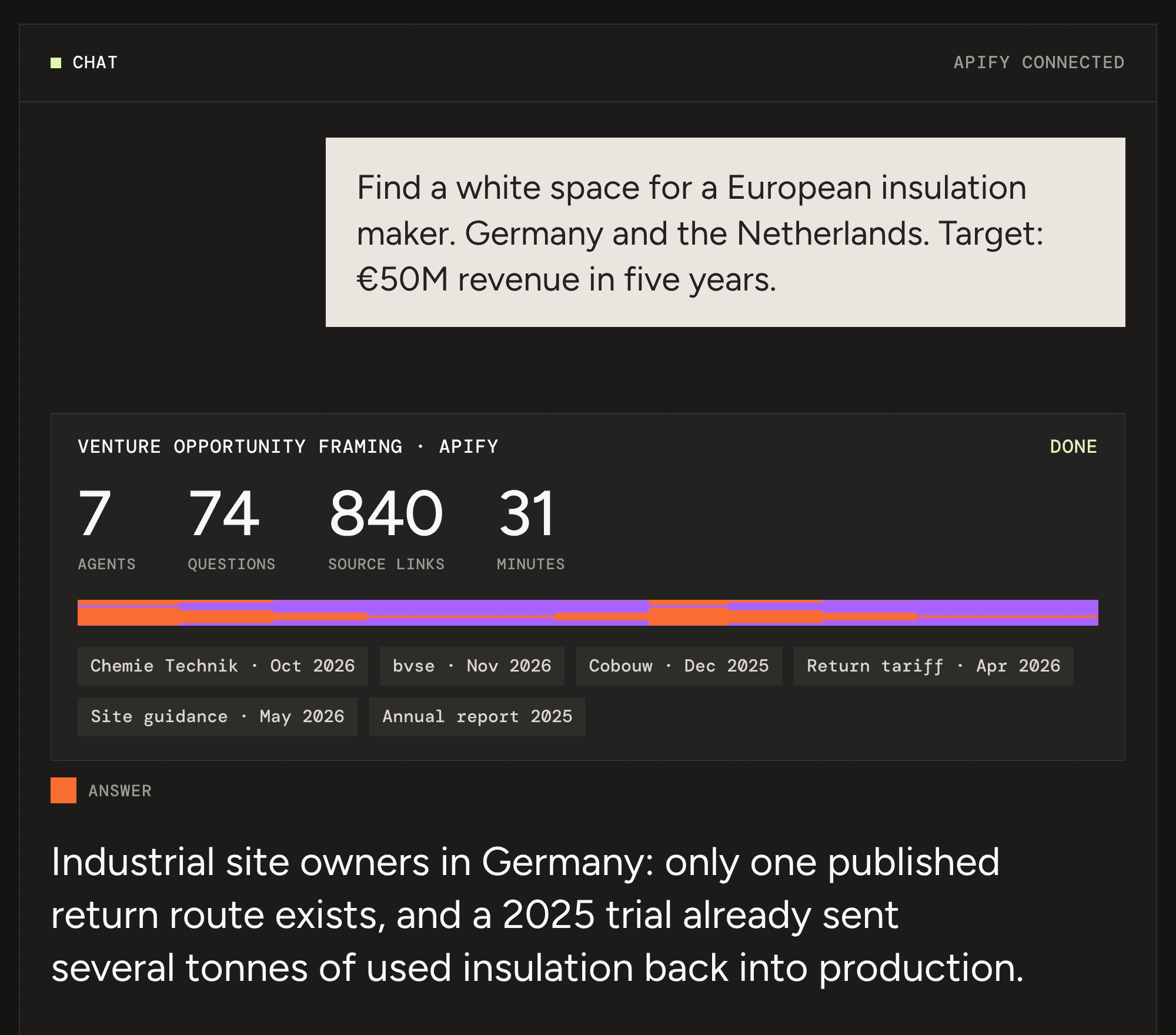 One request, one run, one answer. Company name anonymized.
Our run took 31 minutes: 7 agents worked through 74 research questions and put a source on every finding. The report comes back as HTML, Markdown and JSON, plus dataset rows with each section and its sources.
Step 3: Read the ranking
The report lists the candidate spaces it found and makes a call on each: select, keep warm or set aside. Every call rests on five ratings, each with its sources: customer need, size of the prize against your target, fit with what the company owns, novelty to the company, and crowding.
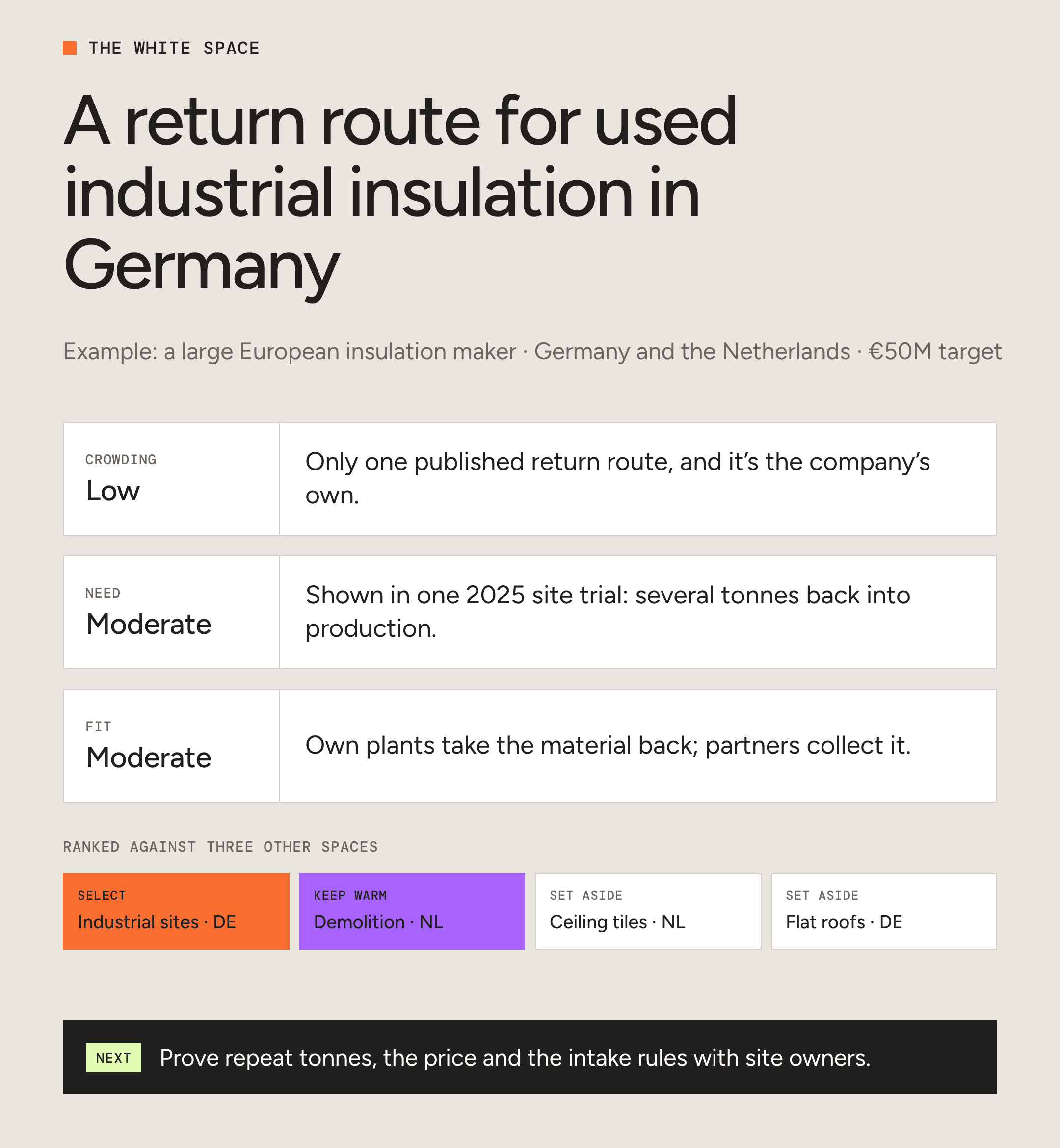 Our example: the selected space, the ratings behind it and the next step.
Under each call the report shows its reasoning. This is the part that compares the top two spaces, as it came out of our run:
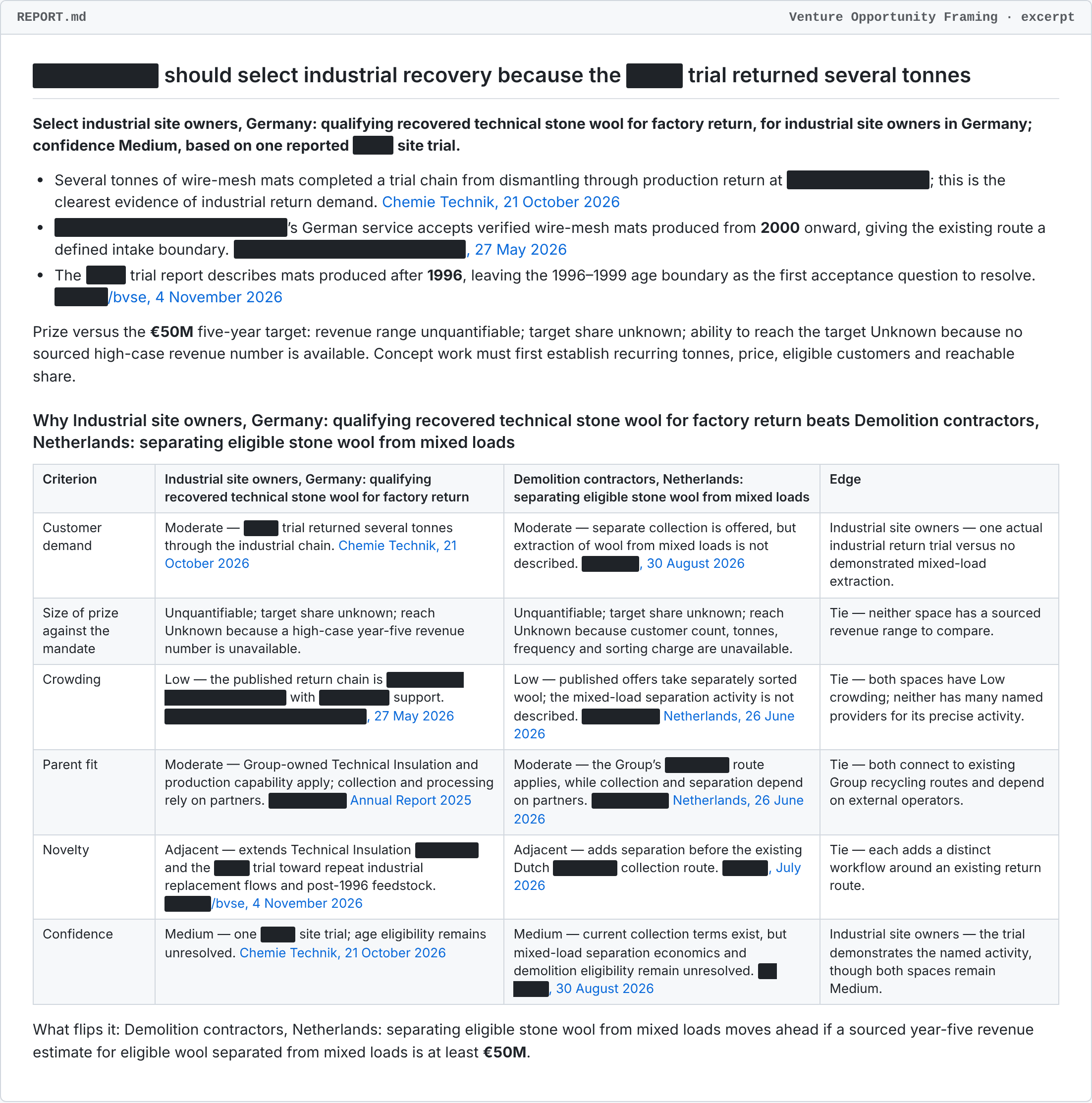 An excerpt from the report our run produced. Company and partner names redacted.
What to look for when you read it:
- Need and crowding first. A white space is a need customers have shown that few others serve. Open the sources behind both ratings before you trust the call.
- Then fit and novelty. Fit says whether the company can deliver with what it already owns. Novelty says whether the space is new for the company or repeats a service it already runs.
- On a tie, read the Edge column. When the top two spaces rate the same, the report names the evidence that decides it and what would flip the call.
- If size comes back unknown, that's your first question. Public sources often can't size a space this early. The report says so instead of guessing, and the missing numbers go to customers in step 5.
Step 4: Frame the problem
The second Actor, Opportunity Hypothesis Brief, turns the selected space into ranked user and problem hypotheses and checks each against existing alternatives, counter-evidence and missing proof. It takes three fields:
- Opportunity scope: the selected space in a sentence or two, with the evidence from the report you want it to build on.
- Team evidence: what your team has learned first-hand, with dates. "Not tracked" on the first run.
- Intended handoff: the decision the brief should prepare, for example whether to start concept work on this space.
Step 5: Test with customers
The brief ends with the questions concept work has to answer first. Expect questions like these:
- How big is it: how many customers, and how much volume or spend each year. This is what finally sizes the space against your target.
- What qualifies: which cases the offer covers, and where today's workaround falls short.
- Who pays what: the price, who owns the budget, and who funds the setup.
- Who delivers what: what the company does itself and what partners have to commit.
Turn them into an interview guide and take it to customers in the selected space. Then put the dated interview notes into the brief's Team evidence field and run it again: the next run weighs your notes alongside the public sources.
Automate it on Apify
Once the inputs work, you don't need to start the runs by hand:
- Tasks keep your inputs, so the rerun after new interviews is one click.
- Schedules rerun the framing on a calendar, so you see when the ranking moves with the market. Each scheduled run is a new report.
- Integrations send the results where your team works: Slack, email, Google Drive, Make, Zapier, n8n, or a webhook to your own system.
The venture-building Actors on Apify
Choosing the white space is the first of several decisions in venture building. Each decision below has its own Actor. Designing the concept itself comes between the second and third rows: that's work for your concept team, or for ours in a venture-building engagement.
| The decision | Run this on Apify | Price per report |
|---|---|---|
| Which new-business space should we pursue? | $14.06 | |
| Which user problems in that space are worth solving? | $9.38 | |
| Does the evidence support the concept? | $20.31 | |
| Is it ready for the portfolio gate? | $25.00 |
Prices are Apify list prices on 18 November 2026, charged per successful report. For venture clienting and corporate venture capital, see the rest of FifthRow's Actors on Apify. For a managed example, see how a Spain-based corporate venture builder went from an eight-step manual discovery process to a single 22-step run (
case study).
What an AI white space analysis can't tell you
The Actors don't design the concept. Framing stops at the choice of space and the hypothesis brief stops at the problem. Both start from public sources (plus your notes, once you add them), so a call like the one above is where the conversations with customers start. The funding decision comes after them.
Try it on your company now


If you'd rather have the whole sequence run for you, from white space to launch case, see our venture-building engagements.
Run it on Apify: the three options
Option 1 · Apify Console, no code
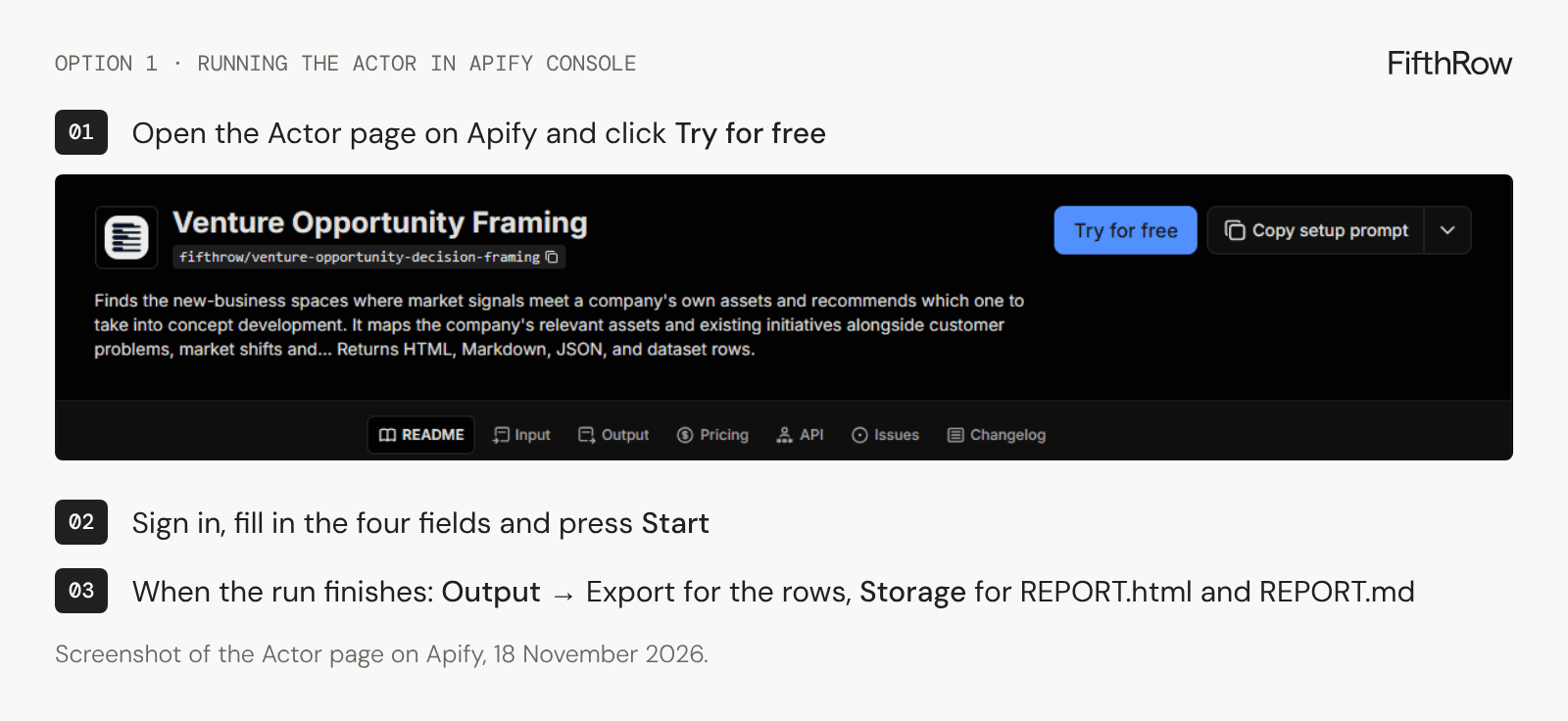 Open the Actor page, click Try for free, fill in the four fields and press Start.
Option 2 · Apify API
Start the run with your Apify API token. maxTotalChargeUsd caps what the run can charge:
curl -X POST "https://api.apify.com/v2/acts/fifthrow~venture-opportunity-decision-framing/runs?maxTotalChargeUsd=15" \
  -H "Authorization: Bearer $APIFY_TOKEN" \
  -H "Content-Type: application/json" \
  -d '{
    "COMPANY": "[Company] ([company website])",
    "SIGNALS_AND_ASSETS": "Construction and demolition waste: take-back, sorting and recycling of mineral wool insulation as landfill limits tighten",
    "TARGET_GEOGRAPHY": "Germany and the Netherlands",
    "VENTURE_MANDATE": "EUR 50M revenue in five years"
  }'
The response includes the run's id. The run takes around an hour, so poll the run or add a webhook, then read the report from the run's key-value store:
curl "https://api.apify.com/v2/actor-runs/RUN_ID/key-value-store/records/REPORT.md" \
  -H "Authorization: Bearer $APIFY_TOKEN"
Option 3 · An AI assistant
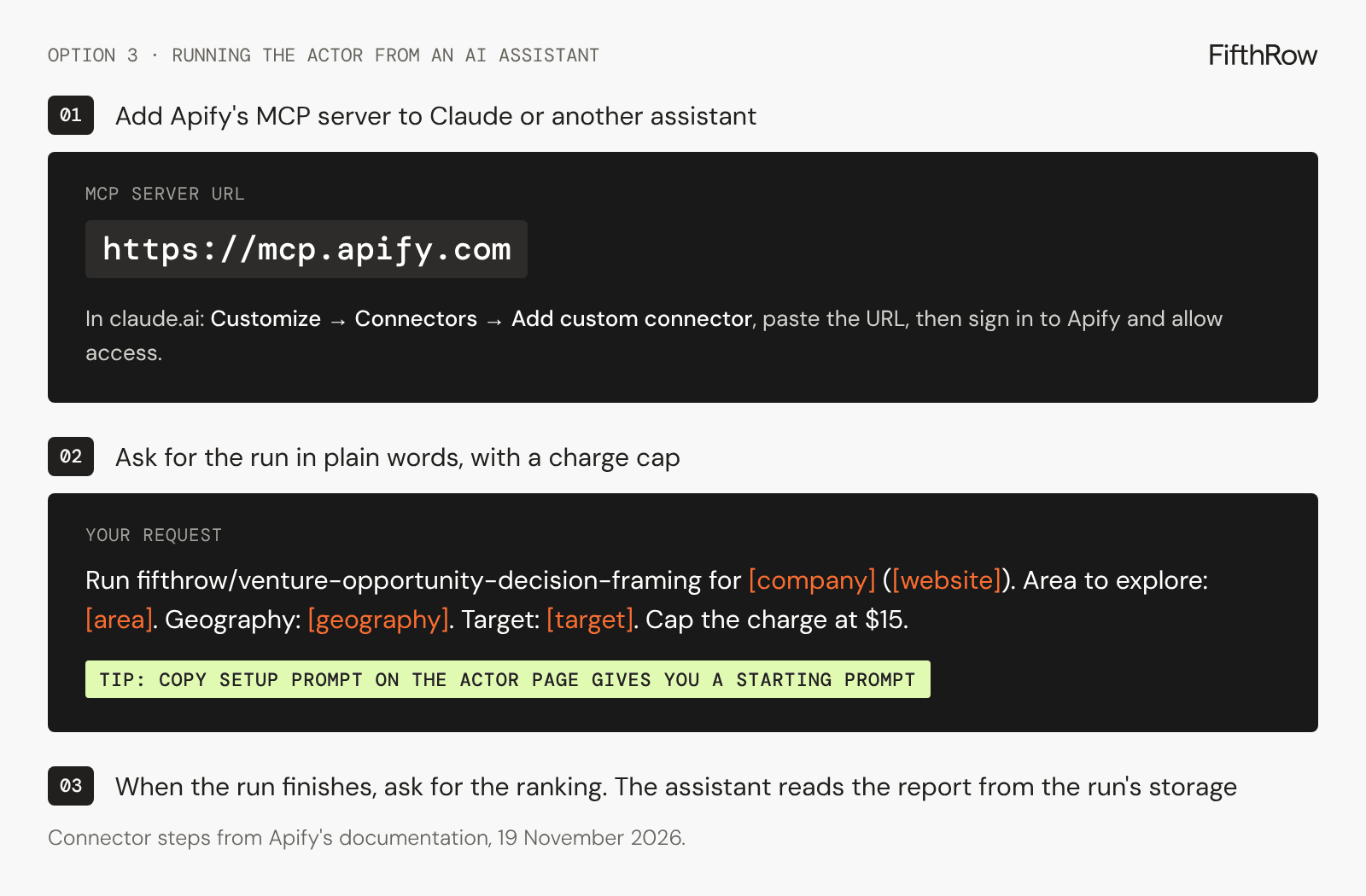 Add the connector once, then ask in plain words, as in step 2.
Frequently asked questions
What is a white space analysis?
A white space analysis finds market needs a company is well placed to serve and that competitors don't serve well yet. It ranks candidate spaces on customer need, size of prize, fit with the company's assets, novelty and crowding, and recommends which one to develop.
Is white space analysis the same as gap analysis?
No. A gap analysis compares where a company is today with where it wants to be. White space analysis looks outward, for customer needs and markets the company doesn't serve yet.
What is an Actor on Apify?
A ready-made agent or tool you run on Apify, the cloud platform, from its web console, its API or an AI assistant. You pay per run or per result; FifthRow's Actors charge per successful report.
Do I need to write code to run it?
No. In Apify Console you fill in four fields and press Start. The Apify API and Apify's MCP server are there if you want to run it from your own code or from an AI assistant.
How long does a white space analysis take with AI?
Our example run took 31 minutes on Apify. The Actor pages give a typical runtime of about 1 hour 7 minutes for Venture Opportunity Framing and about 29 minutes for the Opportunity Hypothesis Brief.
What does it cost?
On Apify you pay per successful report: $14.06 for Venture Opportunity Framing and $9.38 for the Opportunity Hypothesis Brief, at list prices on 18 November 2026.
Can I run it on my own company?
Yes. Open Venture Opportunity Framing on Apify, put your company in the Company field and describe the area and the target in a line or two each. The framing Actor researches public sources; the hypothesis brief also takes your team's own dated notes.

Related topics

AI Agent Orchestration Goes Enterprise: The April 2026 Playbook for Systematic Innovation, Risk, and Value at Scale
From Pilots to Platforms: ICSC+PROPTECH 2026 and Qualcomm’s 6G Foundry-Defining the New Era of Enterprise Innovation
AI Data Centers Shift to Grid-to-Chip System Design
Matter More

FifthRow – The Agentic Consultancy
Copyright 2026 FifthRow Inc., Privacy policy